SweetP Productions presents:

Hides (history)
Boost your productivity.
for macOS 14+

Hides Highlights
An uncluttered distraction free workspace.
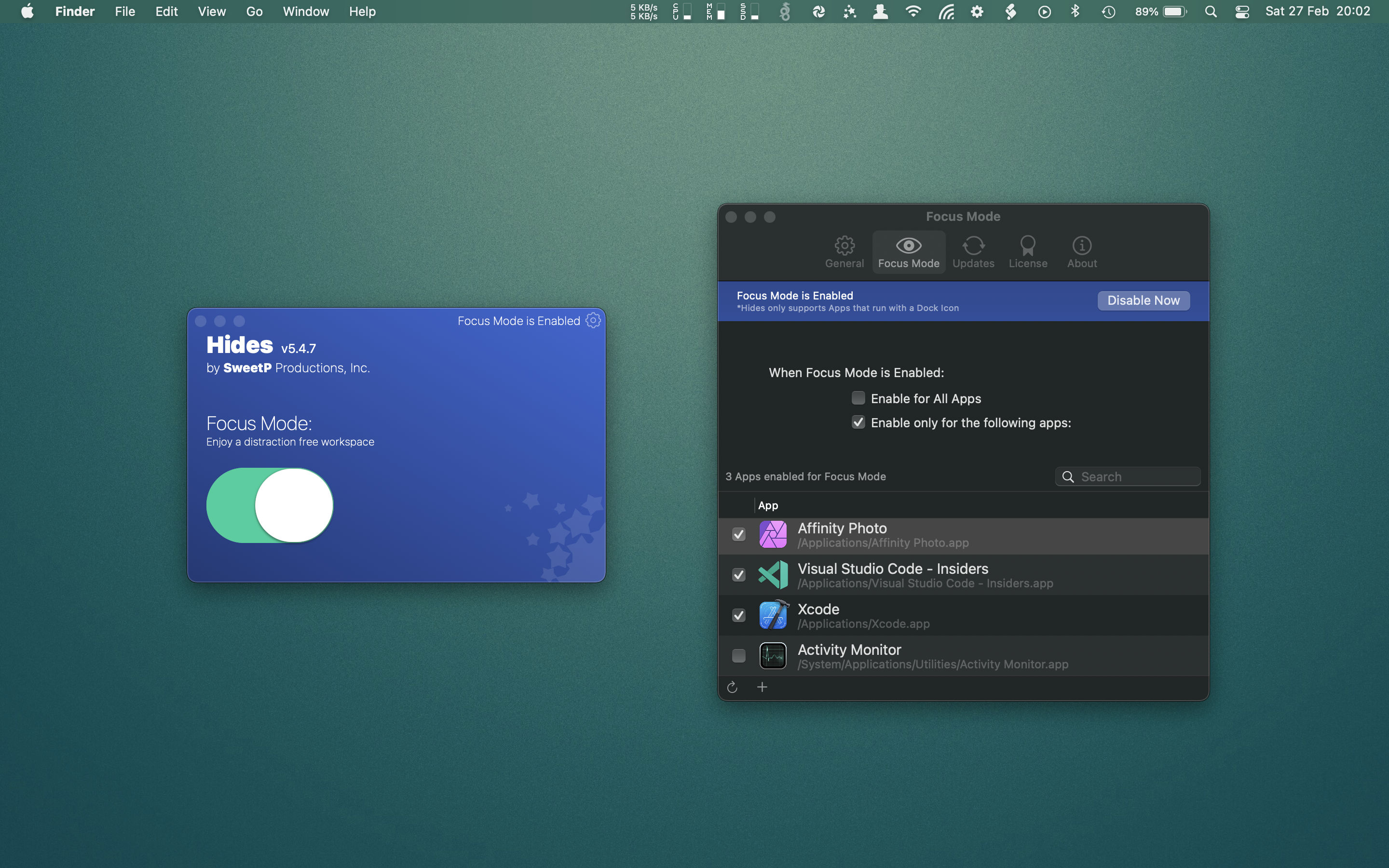
Focus Mode
Focus Mode enables you to quickly hide all apps except the app you're currently working in. Once enabled, let Hides take care of business, so you can work. Focus mode helps you to target your attention on what is directly in front of you! It can be configured globally or for specific Apps, and is super easy to enable or disable.
Handy Shortcuts
It's not enough that Hides is super useful, it also has to be user friendly. It's a breeze to configure global keyboard shortcuts for all the main features. Once you've configured Hides just the way you like it, you'll never need to open it again!
Super simple
Hides does one job, and does it well. There's no bloated features getting in the way. So it's never confusing, and it just works. Just the way all good software should be. It sits up in your menubar, waiting to get to work. But don't worry, it's not consuming resources.
Hides Screenshots
Super georgeous Interface.

Intuitive
No instructions needed!

Customize
Configure to run only for specific apps
Global shortcuts
Important functions are only a keystroke away!
Hides Questions
What can it do, what do you need, and why is it useful.
What can it do?
- Quickly Hide all currently open apps via the menu or shortcut key
- Hide all open apps except the current one via menu or shortcut
- Automatically hide all apps except the active app (Focus Mode)
What you will need
- 1 Mac running macOS 14 or better (Tahoe recommended)
Why is it useful?
- Sometimes its hard to focus on your work. Hides can quickly and effortlessly remove distractions from your desktop without any intervention.
- Whenever you open a new app, all the other open apps are hidden - this enables you to focus on whats right in front of you. (Focus Mode)
What does Hides support?
- macOS 14 or better (Tahoe recommended)
- Localized for English, Dutch, German, Traditional and Simplified Chinese
Hides Reviews
Don't take our word for it, see what others are saying about Hides.
App Store
4.7
out of 5
14 Ratings
Rating details
This rating is aggregated from Apple App Store customer ratings.
Stores included
- 🇺🇸 United States
- 🇨🇦 Canada
- 🇦🇺 Australia
Great App
★★★★★
by jsmithdesign - Oct 2023 - United States
Works as described.
Great app! Multiple monitors
★★★★★
by Parker Marius - Aug 2020 - United States
This app is a must for me. Great job! Please add configurable multiple monitor support with the option to hide apps only on one of them. Thanks!
Useful app
★★★★★
by mikokim - Jul 2016 - United States
Create a distraction-free desktop/work environment to help you focus on your task; set keyboard short cuts to enable and disable the single-app mode or instantly hide the currently active app— it’s simple and fast, and has a small footprint. Highly recommended.
Hides Rock to enable make the old Mac Command-Tab work like new
★★★★★
by Imaclyle - Dec 2015 - United States
Hides is an awesome simple App. I am an old Mac Guy since March of 1984 and as the mac OS progressed I think it was Finder Rev 8 “Command Tab” Would hide the app you were in and auto switch to full screen of the next App. It’s back and al souped up for ElCaptain. Awesome App have used it since 2013. Simple and effective.
Good but a few ideas...
★★★★
by Verdulo - Aug 2015 - United States
Hides is good. It’s competent, does what it says and isn’t a resource hog. I like and use it. I’d love to see the following added: - make the menubar icon a button rather than a pulldown menu. Clicking and holding down the icon and aiming for the Hide All Apps item slows me down and is tedious. I know there is a keyboard equivelent but I prefer my mouse. At the very least, the “Hide All Apps” selector should be at the very top of the menu. If it were a button an alt-click would open the regular…